
How to Choose a Desk Mat Size: Measure Your Setup Before You Buy
The right desk mat isn’t determined by how many monitors you have. It depends on the usable space your hands and equipment need. If you’re wondering how to choose desk mat size, start by measuring your setup rather than guessing from an “XL” label.
You might find that your keyboard fits but your mouse has too little room to move, or that a mat crowds a monitor stand or reaches the desk edge. Avoid the guesswork by measuring the clear desk area, then allowing for your keyboard, mouse movement and anything else that needs to stay in place.
This guide explains how to measure your workspace and choose a size that suits the way you work. You’ll see how Garage Print’s desk pad dimensions, 90cm × 40cm and 61cm × 35cm, compare with your usable space. We’ll also cover how your equipment and working habits affect the area you need.
Key Takeaways
- Learn how to choose desk mat size by balancing usable desk space, equipment and room to move.
- Measure your clear desk area in centimetres, recording width and depth separately.
- Match the mat to your keyboard, mouse movement and the tasks you do at your desk.
- Use a paper or removable-tape outline to preview the fit before you commit.
- Compare your measurements with Garage Print’s 90cm × 40cm and 61cm × 35cm desk pad options.
How to choose a desk mat size for your actual workspace
It’s reasonable to wonder whether a mat will take over your desk, cramp your mouse movement or leave too little room for your equipment. The desk’s full width and depth don’t show how much space is available once a monitor stand, speakers or other essentials are in place.
A suitable desk mat size depends on the clear desk surface, the footprint of your equipment and the space you need to move comfortably. A desk pad, also known as a desk mat, creates a defined surface for your setup, but it doesn’t need to cover the whole desk. Measure the area you can use, then decide which items and movements you want the mat to accommodate.
What should a desk mat cover?
Start with your working layout, not a target coverage percentage. If you mainly type and use a mouse, consider the keyboard’s position and the full area your mouse travels through. If you write by hand, include space for a notebook or paperwork where you naturally reach for it.
The mat should support the equipment and movements you want on its surface. You can leave a monitor stand, speakers or other items directly on the desk if that suits your layout. A mat covering your keyboard and mouse area may be more practical than one that fills every available centimetre.
Which measurements matter before choosing?
Measure the clear space where the mat will sit, recording width and depth separately in centimetres. Measure between the actual boundaries rather than relying on the desk’s advertised dimensions. A stand blocking the back edge or an object narrowing one side reduces the usable footprint.
Include the mouse’s full working area beside the keyboard. Move it through the range you normally use and note where the mat needs to stop to avoid an edge, stand or other obstruction. If your setup shifts during the day, account for those movements too. You’ll then have a realistic outline to compare with available mat dimensions, without assuming the largest option is automatically the best fit.
Measure your desk and equipment before choosing a desk mat
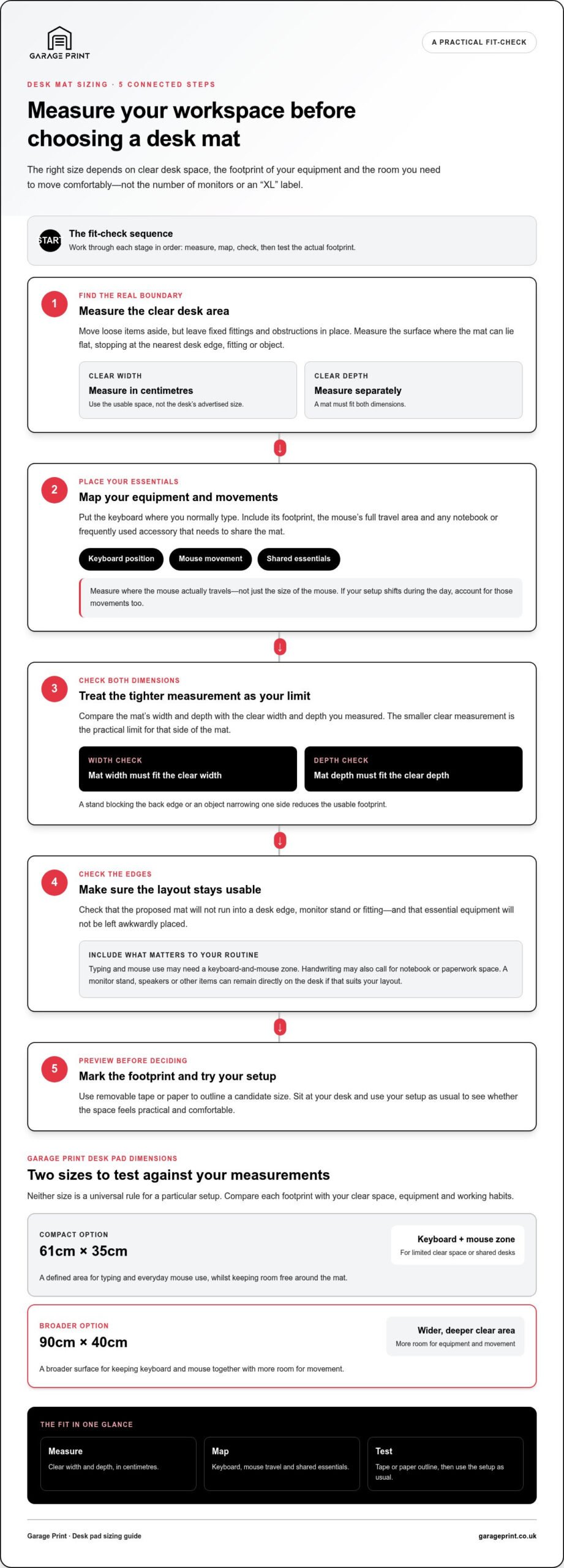
A few careful measurements can replace guesswork with a clear fit check. If you’re figuring out how to choose desk mat size, measure the free surface first, then map your equipment and normal movements within it. Keep width and depth separate: the mat must fit both ways.
Measure the clear desk area
Move loose items aside and identify the part of the desk where a mat can lie flat and remain accessible. Measure the usable width and depth in centimetres, stopping at the nearest desk edge, fixed fitting or object that limits placement. The smaller clear measurement is the practical limit for that side of the mat, not the full desk measurement on a product label.
Measure the clear desk area, map your equipment, then test the proposed mat outline. This order shows whether the dimensions work together before you order.
Map your keyboard, mouse and other essentials
Put your keyboard where you normally type and measure its footprint, including the space it needs to sit comfortably. Beside it, trace the area your mouse actually travels through. Don’t measure only the mouse itself, as its movement needs room too. If a notebook or frequently used accessory needs to share the mat, include it in your layout.
Use a simple fit-check method
- Step 1: Clear the intended mat area, leaving fixed fittings and obstructions in place.
- Step 2: Measure the usable width and depth in centimetres. Record each separately and treat the tighter dimension as your limit.
- Step 3: Place your keyboard and other essentials, then mark their positions and the mouse’s usual travel area.
- Step 4: Check the edges. Make sure the proposed mat won’t run into a desk edge, stand or fitting, or leave essential equipment awkwardly placed.
- Step 5: Mark the candidate mat footprint with removable tape or paper. Sit at your desk and use your setup as usual to see whether the outline feels practical.
This final check makes dimensions easier to picture in your own workspace. Mark out Garage Print’s 61cm × 35cm or 90cm × 40cm desk pad sizes and compare each outline with your measurements. Keep your posture comfortable as you test. OSF HealthCare’s guidance on an ergonomic desk setup also highlights the importance of positioning your workstation around your body. Once you’ve measured the space, compare your layout with custom-printed desk pads.
Match desk mat dimensions to your equipment and working style
The best fit depends on how your desk works day to day, not just the size of your keyboard or the number of screens. A compact keyboard-and-mouse zone may be enough if you want to keep the rest of the desk clear. If you move your mouse widely, take notes beside your keyboard or share the desk, a broader surface may suit you better. The useful footprint supports your routine without crowding everything else.
Use this comparison as a starting point, then test the dimensions against your own measurements. Neither option is a universal rule for a particular setup.
| Available desk space | Equipment footprint | Intended use | Size to test |
|---|---|---|---|
| Limited clear space, or a desk shared with other items | Keyboard and mouse area, with movement kept within a defined zone | Typing and everyday mouse use, whilst keeping room free around the mat | 61cm × 35cm |
| A wider, deeper clear area | Keyboard and mouse positioned together, with more room for movement | Keeping a broader work surface under frequently used equipment | 90cm × 40cm |
When a compact desk mat may fit better
A compact mat can suit a setup where you want a clear boundary around your keyboard and mouse but need to preserve desk space for other tasks or equipment. Compare your measurements with Garage Print’s 61cm × 35cm desk pad. Mark out the footprint and check that your keyboard fits comfortably and your mouse can travel through its usual range. Treat it as a size to test, not a rule for every compact setup.
When a wider desk mat may suit your layout
A broader mat can bring the keyboard and mouse areas together on one continuous surface, particularly if you move your mouse frequently or like keeping everyday items nearby. Compare Garage Print’s 90cm × 40cm desk pad with the clear width and depth you recorded, then test its outline against your layout. The extra coverage is useful only if it fits without obstructing stands, edges or shared space.
For dual-monitor users, screen count alone doesn’t determine mat size. The usable desk area and equipment positions still matter. If you’re considering how the 90cm × 40cm option might fit a two-screen layout, see the dedicated 90cm × 40cm dual-monitor guide.
Check desk mat fit, clearance and comfort before you order
The largest mat isn’t automatically the most practical. A bigger footprint can bring more of your setup onto one surface, but it can also crowd a desk edge, interfere with a stand or take space you need for other tasks. Test the mat outline in place and use your desk as you normally would before choosing.
Check edges, clearance and everyday movement
Use removable tape or sheets of paper to mark the mat’s proposed outline. Keep the whole footprint on a flat, usable part of the desk, clear of edges and fixed fittings. Place your keyboard and frequently used accessories inside the outline, then move your mouse through its usual range. Try your everyday tasks too, including reaching for a notebook or shifting items you use often.
Notice any awkward reaches or blocked movements. If the outline forces you to reposition equipment or leaves too little room for your normal work, adjust the placement or test a different size. A few minutes of testing can reveal a poor fit that the dimensions alone don’t make obvious.
Use both desk pad dimensions as test outlines
Mark out Garage Print’s 61cm × 35cm and 90cm × 40cm desk pad footprints separately. Compare each with your measured clear space, then sit down and test your keyboard position, mouse movement and daily tasks within each outline. The smaller footprint may preserve more uncovered desk area; the larger may bring more equipment together. The better fit depends on your usable space and the coverage you want, not on a rule that bigger is always better.
For a direct comparison of these two footprints, read the guide to 90cm × 40cm versus 61cm × 35cm desk pads.
Quick fit check: edges clear, equipment placed, mouse moving freely, daily tasks comfortable. If one outline passes all four checks without taking over useful desk space, it’s a strong size candidate.
Compare the available dimensions with your setup by exploring Garage Print desk pads.
Choose a Garage Print desk mat size with confidence
You’ve done the useful part: measured the clear desk area and considered where your keyboard, mouse and everyday essentials need to sit. Keep those measurements in front of you as you compare mat dimensions. The aim isn’t to cover as much desk as possible, but to find a footprint that fits your space and supports how you work.
Compare your measurements with available desk pad dimensions
Garage Print’s custom-printed desk pads are available in two dimensions: 61cm × 35cm and 90cm × 40cm. Compare the width and depth of each with the usable area you measured, then consider how much of your working layout you want the pad to cover. Even if a size looks suitable on paper, check that it leaves room for comfortable equipment placement and movement.
The 61cm × 35cm size has a smaller footprint to compare with your setup; the 90cm × 40cm size covers a broader area. Neither is automatically the right choice for a particular desk or device arrangement. If you’re deciding how to choose desk mat size, let your measured clearance and equipment layout guide you rather than relying on labels or assumptions.
Keep product types distinct as you browse: Garage Print also offers a custom-printed play mat in 61cm × 35cm, separately from its desk pads. The shared dimensions don’t make the two categories interchangeable.
Take the next step with a measured setup
Have these details ready as you browse: the clear width and depth where the pad will sit, your keyboard’s position, the space your mouse needs to move, and any accessories or writing materials you want within reach. If you’ve tested the dimensions with a paper or tape outline, use what felt comfortable during your normal work as your final point of comparison.
Compare your measured workspace with the two desk pad sizes, then choose the footprint that fits your setup. Explore Garage Print desk pads.
Choose a desk mat that works with your setup
The surest way to choose a mat is to start with your usable desk area, then account for your keyboard, mouse movement and daily tasks. Measure width and depth separately, and test the outline before ordering. That turns how to choose desk mat size into a practical fit check rather than a guess based on a size label.
Garage Print’s custom-printed desk pads come in 90cm × 40cm and 61cm × 35cm dimensions. Compare both with your measured space and choose the footprint that leaves enough clearance for your equipment and work habits. A custom-printed play mat is also available in 61cm × 35cm as a separate product.
With your measurements in hand, focus on the size that fits your desk, not simply the largest option. Explore Garage Print desk pads and choose a footprint for your setup.
Frequently Asked Questions
How do I measure my desk for a desk mat?
Measure the clear, usable desk area where the mat can sit flat. Record width and depth separately in centimetres, allowing for desk edges, monitor stands and other fixed objects. Then position your keyboard and mark the area your mouse needs to move. This measurement-first approach is a straightforward way to understand how to choose desk mat size for your setup. Outline a candidate size with paper or removable tape to check the fit.
What size desk mat do I need for a keyboard and mouse?
Choose dimensions that fit your keyboard and the mouse movement you actually use, rather than relying on a universal size. Measure the keyboard in its normal position, then allow for the space your hand and mouse need beside it. Garage Print’s desk pads measure 61cm × 35cm and 90cm × 40cm, giving you two specific footprints to compare with your usable desk space and working layout.
Is a 90cm × 40cm desk mat too large for a small desk?
It may be too large if your desk doesn’t have at least 90cm of clear width and 40cm of clear depth for the mat’s footprint. Check the space remaining after accounting for stands, edges and objects that limit placement. Mark out the dimensions with tape or paper, then test your usual setup. If the outline crowds equipment or interrupts everyday tasks, compare it with the smaller footprint.
Can a 61cm × 35cm desk mat fit a keyboard and mouse?
It can, depending on your keyboard’s footprint and how much room you need for mouse movement. Place your keyboard where you normally type, then check whether the mouse can travel freely within the remaining space. Garage Print’s 61cm × 35cm desk pad is a useful size to test against that layout, but measure your equipment and movement rather than assuming it will fit every setup.
Should a desk mat cover the whole desk?
No, a desk mat doesn’t need to cover the entire desk to be useful. You might want it under your keyboard and mouse, or large enough to include a nearby notebook or frequently used accessories. Leave other areas uncovered if you use them for different tasks or need the space clear. Choose coverage that supports your work comfortably while keeping the mat within the usable desk area.
How much space should I leave around a desk mat?
There’s no fixed clearance that suits every desk. Leave enough room for the mat to sit flat without running over the edge or meeting a stand, fitting or other obstruction. Check that your keyboard and accessories sit comfortably on the mat and that your mouse can move through its normal range. Testing the outline in place shows whether the mat leaves useful space for your everyday tasks.