
61cm x 35cm Desk Mat: A Compact Custom-Printed Fit
Will a 61cm x 35cm desk mat fit your desk and give your keyboard and mouse room to work together? It measures 61cm across by 35cm deep, but those dimensions can be difficult to picture against a real setup.
Before choosing, compare the footprint with your usable desk space, equipment dimensions and preferred mouse movement. This custom-printed desk mat is a compact option for a focused workspace, but the fit depends on how you arrange your equipment and how much room you like around it.
This guide explains what the 61cm x 35cm footprint means in practice, how to measure your desk and equipment, and which setups it may suit. It also compares the format with the larger 90cm x 40cm desk mat. A simple measure-up will help you choose a size that works for your setup.
Key Takeaways
- Judge the 61cm x 35cm desk mat by your usable desktop space, equipment dimensions and preferred spacing.
- Check how monitor stands, speakers and accessories affect the area available for your keyboard and mouse.
- Compare the 61cm x 35cm and 90cm x 40cm formats by measuring the footprint your setup needs.
- Clear your workspace, mark out the mat’s footprint and test your equipment placement before choosing.
- Use your fit check to decide whether Garage Print’s custom-printed 61cm x 35cm desk mat suits your setup.
What does a 61cm x 35cm desk mat actually cover?
A 61cm x 35cm desk mat covers a rectangle 61cm wide across your desk and 35cm deep from front to back. That is 610mm by 350mm. These measurements describe the mat itself, not a guaranteed amount of space for a particular keyboard-and-mouse combination.
The width runs from left to right, while the depth extends from the edge nearest you towards the back of the desk. This compact format can suit a focused setup, but usable space depends on the size and position of your equipment, the desk layout and how much room you prefer around your mouse. A keyboard may fit within the outline yet leave little space for comfortable mouse movement beside it.
A desk pad can help define an area on a desktop; What is a Desk Pad? offers a general overview of the category. For choosing a size, your own measurements are more useful than a broad label such as “compact”. Measure the equipment and space you actually use.
How large is 61cm x 35cm in everyday terms?
Use a tape measure to mark a rectangle 61cm across and 35cm deep. Small pieces of masking tape can outline the footprint without committing to a layout. Position the outline where you intend to use the mat, leaving fixed items such as a monitor stand in place. This shows how much of the desktop is genuinely available.
Check the full outline, not just its width. An object at the back may limit the usable depth, while a desk edge or item beside the rectangle may affect where you can place your equipment. If the marked area already feels crowded, consider whether the surrounding desk space can accommodate anything that needs to stay close by.
What equipment might fit on a compact desk mat?
Measure your keyboard and mouse, then arrange them inside the outline as you would during a normal work session. Include the space you need to move the mouse, not just the area it occupies while resting. A centred keyboard may leave room on either side; shifting it towards one edge can create more room beside it, but less on the other side.
Fit depends on your equipment and habits. A full-width keyboard takes up a different amount of space from a compact one, and mouse movement varies by user. Test your actual devices rather than relying on a familiar arrangement or a product image. If part of the keyboard or mouse sits beyond the outline, decide whether that suits the way you work before choosing this size.
How a 61cm x 35cm desk mat fits a real workspace
A compact mat can define an area for focused keyboard-and-mouse use, but its footprint is only part of the fit. The arrangement of everything else on your desk affects how practical that area is. A patch may be wide enough on paper yet awkward to use if a monitor stand crowds the back edge or leaves too little room to move your mouse.
Equipment measurements determine real-world fit, not the mat dimensions alone. Consider both the surface the mat covers and the working space your hands and mouse need. A mouse may rest in a small area but require more room as you move it. Test the arrangement in use, not only as a still layout.
Planning keyboard and mouse placement
Measure your keyboard’s width and decide where the mouse naturally sits during a typical session. Place both in the intended positions, then check the clearance around them, including the sweep of your hand and room to reposition the mouse. A close side-by-side arrangement can look tidy but feel restrictive once you start using it.
Test the layout you actually prefer. You might put the mouse to the right or left of the keyboard, or move the keyboard off-centre to make space. Each change affects the room left for the other device. Try the arrangement you use most often before settling on the mat size.
Keeping other desk items outside the mat footprint
Check whether monitor stands, laptop risers, speakers, stationery or other accessories overlap the area you plan to use. Decide which items must stay in place and which can move. Moving a notebook or pen holder may free useful space, while a fixed stand could reduce the available depth.
Think in zones: reserve the mat for the equipment you use there, and move items that do not need to sit on or beside it. This can make a compact layout feel more deliberate without changing the footprint. Your own desk arrangement and movement needs matter more than how spacious a mat looks in a product image.
Once you have tested the layout, note what feels comfortable and what needs to move. If the arrangement works within the outline, Garage Print’s custom-printed desk mat can add a personal design to your workspace. Choose based on the layout you have tested, rather than assuming every keyboard-and-mouse pairing will fit in the same way.
61Cm x 35cm versus a larger desk mat: what changes?
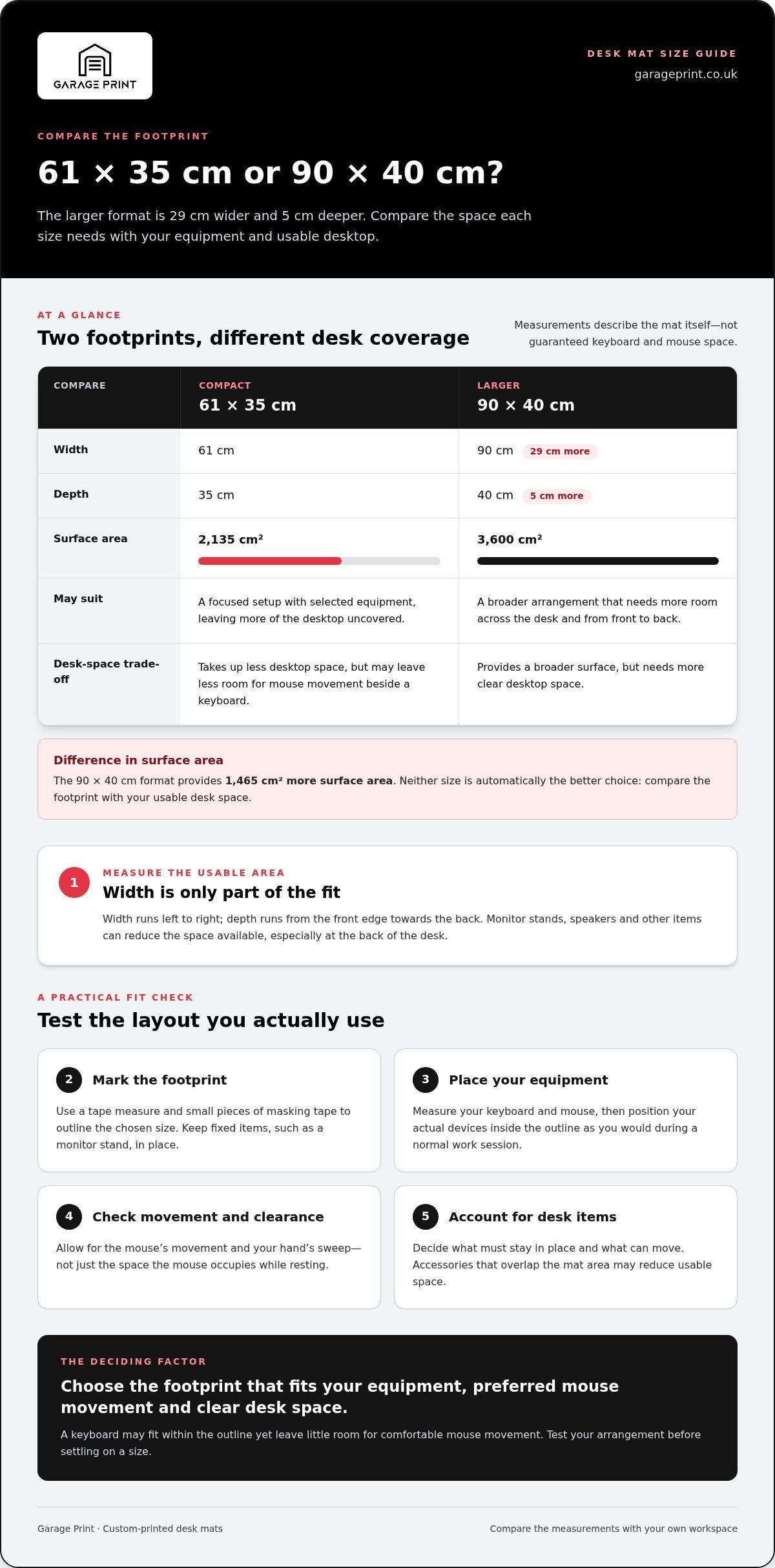
A 90cm x 40cm mat is 29cm wider and 5cm deeper than a 61cm x 35cm mat. That gives the larger format a broader footprint, but it also takes up more desktop space. Neither size is automatically the better choice. Compare the area your equipment needs with the clear desk space you want to keep.
| Format | Width | Depth | May suit |
|---|---|---|---|
| Compact | 61cm | 35cm | A focused setup with selected equipment and more desktop left uncovered |
| Larger | 90cm | 40cm | A broader arrangement that needs more room across and from front to back |
By footprint, the 61cm x 35cm format covers 2,135cm², whilst the 90cm x 40cm format covers 3,600cm². The larger size provides 1,465cm² more surface area, but needs more clear desktop. Compare these dimensions with your usable desk area, not just the desk’s overall width and depth.
When the compact 61cm x 35cm format makes sense
The compact format may suit a focused setup if you want a defined area for selected equipment and prefer to leave other parts of the desk uncovered. It can work for a layout where only some of your devices need to sit on a mat. Measure first, though: “compact” does not mean it will fit every desk or arrangement. Mark out the footprint and check how it sits alongside fixed items and desk edges.
When to consider the 90cm x 40cm alternative
Consider the larger format if your planned arrangement needs more width or depth, or you want a broader area across the desk. The extra space may suit a multi-device layout, but the footprint still needs to fit your desktop and leave room for items that must remain in place. For a closer look at its dimensions and fit, explore the 90cm x 40cm desk mat guide.
To compare the sizes, outline each footprint on your desk with removable markers, then place your equipment within each shape. Check what fits on the mat and whether the remaining desktop works for your other needs. A focused setup may need less coverage; a broader layout may benefit from the larger footprint. Choose the size that matches your measured setup, rather than assuming more surface is always better.
How to check whether a 61cm x 35cm desk mat suits your desk
A fit check turns the dimensions into a practical test. Measure the desk space you can actually use, recreate the mat’s footprint and try your normal equipment arrangement. The desk’s advertised dimensions alone may not reflect the space available once fixed items and your working habits are taken into account.
Use this four-step check:
- Clear: Move aside anything that can be relocated, but leave fixed items where they are.
- Measure: Check the open desk area and measure your keyboard and mouse separately.
- Mark: Outline a 61cm by 35cm rectangle with removable tape, or use paper cut to the same dimensions.
- Test: Place your equipment inside the outline and use it as you normally would.
Measure the usable desk area
Start with the space available after accounting for monitor stands, desk edges and accessories that cannot move. Measure both the clear width and the distance from the front edge to the nearest obstruction. Then note your keyboard’s width and how much room you prefer for your mouse. Keeping these measurements separate helps identify whether the desk, equipment or arrangement is limiting the fit.
Be precise about obstructions. If a stand occupies part of the intended footprint, do not count that area as clear just because the desk is wider overall. Check where each item will sit and leave room for the placement you use day to day.
Test the layout before committing to a size
Arrange your keyboard and mouse within the marked outline, then carry out a normal task. Notice whether the mouse feels cramped, the keyboard sits awkwardly or another item gets in the way. A static arrangement can look fine but feel restrictive in use, so test it with your hands moving naturally.
If you would usually move a speaker, notebook or other accessory, do so during the test. Choose the compact format if the marked outline works with your everyday setup, not only with a temporary arrangement created to make the mat fit.
Before choosing, check:
- Is the full outline on usable desk space, clear of fixed obstructions?
- Does your keyboard sit comfortably within the area?
- Can you move the mouse as you normally would?
- Does the tested layout leave enough space for items that must stay nearby?
If your measurements and test show a comfortable fit, explore Garage Print’s custom-printed 61cm x 35cm desk mat for your setup.
Choosing Garage Print’s custom-printed 61cm x 35cm desk mat
Once your fit check shows that the compact footprint suits your workspace, consider whether this format matches how you want the desk to look and function. Garage Print offers a custom-printed desk mat in 61cm x 35cm, as well as a larger 90cm x 40cm format. Use your measurements to guide the decision, based on your equipment placement and the space you want to keep clear.
Garage Print also offers a separate custom-printed 61cm x 35cm play mat. The desk mat and play mat are distinct products with the same dimensions. Choose the desk mat for your workspace and the play mat for play.
What to decide before choosing a custom-printed mat
First, settle the size. Check that the footprint fits your usable desk area, that your equipment sits where you want it and that mouse movement feels comfortable in normal use. Then consider the design you would like in your workspace and how it will sit alongside your existing desk items.
A custom design can give your workspace a personal touch, but fit still comes first. If the outline feels cramped or forces an awkward arrangement, reconsider the size. A custom print can make the mat your own, but it cannot create more desktop space.
From fit check to choosing your desk mat
Use your test as the final decision point. The compact format may suit a focused setup if it fits your usable desk, your keyboard and mouse placement feels natural, and movement remains comfortable. Your own measurements matter more than a general assumption about which equipment should fit. If the layout works within the marked area, you can choose with a clear idea of how the mat will sit on your desk.
Before you decide, make sure you can answer these questions:
- Does the mat’s footprint fit the open desk area you measured?
- Can you place your equipment as you intend to use it?
- Is there enough room for comfortable mouse movement?
- Does the design suit the workspace you’re creating?
If those checks are settled, Garage Print’s custom-printed desk mat offers a compact option for a measured, focused setup. Take a look at the custom-printed desk mat and choose the format that matches the space you tested.
Make your workspace feel considered
Your desk setup should work for the way you use it, and its design can feel like a natural part of the room. Once the fit is settled, think about the visual direction you want: a subtle image that sits comfortably with your workspace or a more expressive design that gives it character. A considered print can make a compact work area feel distinctly yours.
A 61cm x 35cm desk mat is worth considering when you have measured your space and want a custom-printed option for a focused setup. When you are ready to choose a design, explore Garage Print’s custom-printed desk mats.
Choose a print that feels right for your workspace and make the area where you work more personal.
Frequently Asked Questions
Will a 61cm x 35cm desk mat fit a keyboard and mouse?
It depends on your keyboard’s dimensions and how much room you need to move the mouse. A compact keyboard leaves a different amount of space from a full-width model, and mouse movement varies by user. Try your actual devices in the positions you intend to use, then check whether you can type and move the mouse comfortably.
Is a 61cm x 35cm desk mat big enough for gaming?
It can suit a gaming setup if your equipment and playing style work within the footprint. Consider how far you tend to move the mouse: games involving broad movements may need more room than a setup with shorter movements. Test the mat’s outline with your usual mouse position and posture rather than judging by how much of the desk it covers.
How do I measure my desk for a 61cm x 35cm mat?
Measure the clear surface where you intend to place the mat, accounting for fixed items such as a monitor stand. A paper template can make the dimensions easier to picture: join sheets or trim paper to the intended footprint, then set it on the desk. Check that it does not interfere with your usual writing area, nearby controls or items you need to reach.
Is a 61cm x 35cm desk mat the same as a play mat?
No. Garage Print offers a desk mat and a separate play mat in the same 61cm x 35cm dimensions. Choose the desk mat for your workspace and the play mat for play. The products share measurements but are distinct options, so select the one that matches how you intend to use it.
Should I choose a 61cm x 35cm or 90cm x 40cm desk mat?
Choose based on the arrangement you want, not on the idea that one size is always better. The compact option may suit a keyboard-and-mouse station that leaves other desktop areas free; a broader layout with extra equipment may need more coverage. Decide what you want on the mat and what should remain directly on the desk, then compare both sizes with those priorities.
Can I use a 61cm x 35cm desk mat on a small desk?
Yes, if the usable surface can accommodate it without obstructing the way you work. Account for items that need to stay accessible, such as a notebook or controls, as well as your keyboard and mouse. If fitting the mat forces other items into awkward positions, the resulting layout may be less practical.
What is the difference between a desk mat and a desk pad?
The terms are often used for similar desktop accessories, and naming can vary between sellers. Check the product description and measurements to understand the intended use and size. Garage Print offers a desk mat and a separate play mat; choose according to whether you are setting up a workspace or a play area.